


VicoHome: Smart Home Camera
4.54.91K Reviews
App Specs
- Version
- 4.3.0
- Updated On
- License
- Free
- Downloads
- 1,000,000+
- Developer
- VicoTech
- Categories
- Video Players & Editors
- Platform
- Android, iOS
Screenshots
 Analysis by AppCompare
I find a camera app most useful when it helps a household stay coordinated, not just when someone wants to check a feed. If you share a home with a partner, housemate, or relative, the practical question is how the app fits into everyone’s routines: who checks a camera, who handles an alert, and whether the setup feels manageable when you’re away. VicoHome: Smart Home Camera is aimed at that everyday kind of remote check-in, with a phone serving as the place to view and manage connected cameras.
A useful shared-home routine
Picture leaving for work while a delivery is expected. A quick live view can help you see what is happening at the door, while a camera’s two-way talk can be useful if someone needs a brief instruction. For a household, that can save repeated messages such as “Did the parcel arrive?” It is still worth agreeing who will respond before everyone receives or acts on an alert; an app can show a situation, but it cannot decide which household member should take responsibility.
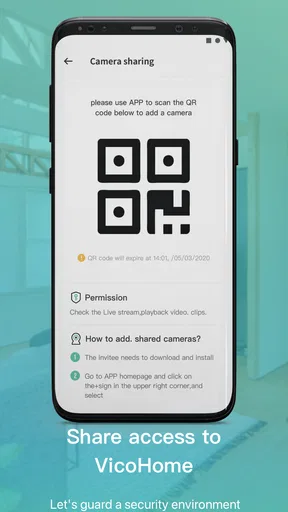
I’d treat camera access as a household decision rather than casually sharing one login. Before inviting another person to use a device, discuss what the camera covers, when it may be checked, and whether everyone who lives there is comfortable with it. That conversation matters especially for indoor cameras, where a useful view of a shared area can also capture ordinary private moments.
Set expectations before connecting devices
The first setup is described as a matter of creating an account and following the connection steps, but the best preparation happens before opening the app: choose where each camera should point, confirm that the intended location has a suitable connection, and decide which views actually help. A camera aimed at a busy window or walkway may create more distractions than useful information. Narrowing the purpose first makes it easier to judge whether alerts and recordings are serving you.
There is also a practical distinction between viewing and storing. The app offers cloud and local storage options, which give you a choice about where recordings go, but those choices come with different habits: local storage means keeping track of the storage setup, while cloud storage may involve account or purchase considerations. I would check the current in-app terms and available options before relying on a particular recording arrangement. The app is free to download, with in-app purchases ranging from $0.99 to $999.99 per item, so it is sensible to review any purchase details rather than assume every storage or service option is included.
Coordination without alert fatigue
Motion alerts are most useful when they point to something you genuinely want to know about. The original experience described here includes customizable detection zones, a helpful way to focus attention on a relevant area instead of every movement in the camera’s view. My tip is to start with a conservative zone and observe what triggers notifications during normal days. Then adjust it if routine movement still produces too many pings. This small bit of tuning can make the difference between an alert you notice and a stream you start ignoring.
For shared use, agree on a simple response routine. One person might check the live view when an alert arrives, then message the others only if there is something they need to handle. That avoids multiple people independently checking the same event, and it makes the phone less disruptive during work or family time. I would not treat a notification as proof of a problem: it is a prompt to look, and ordinary movement can still need context.
Worth Reading Before You Choose

EA SPORTS FC Mobile 26 Is a Bigger Football Game, but It Takes Time

Flipboard Shows What News Apps Must Do Beyond the Feed

Switching to Android Auto Means Rethinking Your Driving Routine

Google Calendar Makes a Crowded Week Easier to Manage

Ludo King Makes the Most of the Minutes Between Plans

Baby Panda World Brings Quick Play to Modern Phones, but Its Game Library Feels Busy
Trust, age, and everyday boundaries
The app is rated for Everyone, but that age label does not replace household judgment about who should operate cameras or see recordings. An adult should handle setup and explain the purpose of a camera to children and visitors in an age-appropriate way. For anyone sharing a home with a caregiver, roommate, or frequent guest, it is considerate to be clear about camera placement and use instead of letting monitoring become an unspoken part of the space.
I’d also keep access and device handling deliberate. Use a secure account, avoid passing credentials around casually, and remove access that is no longer needed if your household arrangements change. These are sensible general steps for a connected-camera account, not a claim that the app provides particular family-management controls. If your priority is a detailed permission system for several household members, check that the controls available to your specific cameras and account meet that need before building your routine around them.
Who will get the most from it?
This is a stronger fit for someone who already has compatible cameras and wants a straightforward phone-based way to check live views, review recordings, and manage camera settings. It can suit a busy household that wants occasional reassurance while out, or someone who needs to check a door or shared space without being physically nearby. Its role is more focused than that of a broad smart-home dashboard: it centers on camera viewing and related controls, rather than being a general-purpose hub for every kind of connected device.
If you only want to see a camera from the same manufacturer, that maker’s own app may be the simpler choice, particularly if you value a tightly integrated setup. If you want a single screen for lights, heating, locks, and cameras, a broader smart-home platform may be a better match. And if you do not want cameras in your home at all, no camera app will solve the underlying privacy concern. The right choice depends less on the number of options and more on whether the cameras you own work with the app and whether its viewing and storage approach suits your routine.
Getting Started with VicoHome
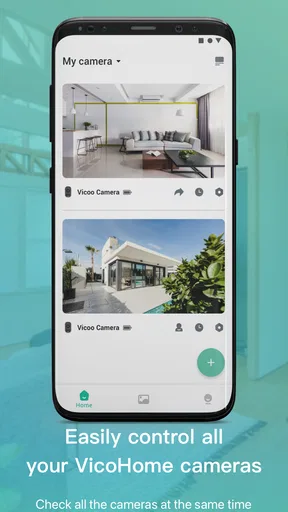
First things first, setting up VicoHome: Smart Home Camera is a breeze. You just download the app from your App Store, create an account, and follow the straightforward instructions to connect your cameras. The app supports a variety of camera models, so it's pretty versatile if you’ve got different brands hanging around your house.
Features That Stand Out
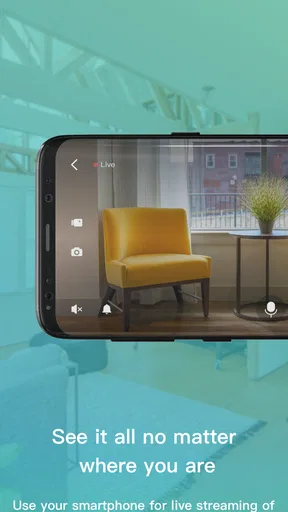
Once you're all set up, you'll notice the app boasts a bunch of features that are incredibly user-friendly. The real gem here is the live streaming. You can check on your home anytime, anywhere, which is perfect for those of us who are a bit on the paranoid side (no judgment here!).
The motion detection is another highlight. You can customize zones for alerts, so you only get notified when something actually happens in the areas you care about. No more random pings every time a car drives by or a leaf falls. Plus, the app’s notifications are swift and reliable, so you’re never left in the dark.
User Experience
What really makes VicoHome shine is its user interface. It's clean, intuitive, and doesn’t overwhelm you with options. Everything is neatly organized, from the live feed to the settings menu. You can easily toggle between cameras, check past recordings, and adjust settings without any hassle.
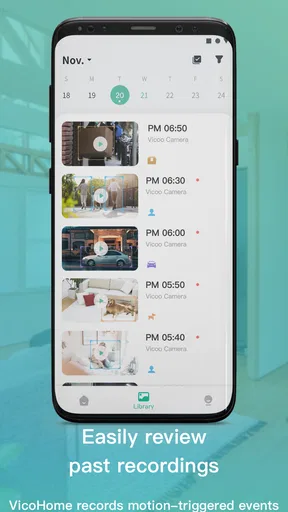
Speaking of recordings, the app offers both cloud and local storage options. This flexibility means you can choose what works best for your privacy needs and storage capacities.
Why You Might Love It
If security is a priority for you, this app’s got you covered. Whether you’re at work, on vacation, or just out running errands, you can rest easy knowing you can peek in on your home whenever you need to. Plus, the ability to talk through the camera is a nice touch, especially if you need to communicate with someone at the door or scare off a suspicious character.
What to check before settling in
Compatibility is the first question I’d answer before planning a multi-camera setup. The app supports a variety of camera models, but that does not mean every camera will work with it. Check the model and its connection steps before buying hardware or moving an existing camera over. A smooth app experience depends on a camera that is actually supported and placed where its connection is dependable.
It also helps to think through how you will use past recordings. If you mainly want an occasional live look, storage may matter less than it would if you expect to review events later. Choose the storage arrangement after considering how often you need recordings, how much space you have locally, and what cloud options cost in the app. This is a better starting point than paying for a plan before you know what your household needs.
In the Video Players & Editors category, this is not a conventional media player for movies or clips; its value comes from bringing camera feeds and camera-related controls into one phone app. It is free, developed by vicohome team, and has an average rating of 4.6 from around 42 thousand ratings, with more than a million installs. It was released on November 12, 2020, and version 2.81.0 requires Android 7.0 or later. Those figures offer useful context, but I would still make compatibility, privacy expectations, and storage choices the deciding factors for a household.
My household verdict
I’d recommend VicoHome to someone who wants a simple way to check compatible home cameras and who is willing to set sensible boundaries around alerts, access, and recordings. The combination of live viewing, motion-zone customization, recording options, and two-way talk can make everyday check-ins more practical, especially when a household agrees on how to use them.
I would hesitate if you need extensive shared-account controls, want one app to manage a much wider range of smart-home equipment, or are uncomfortable with cameras in shared spaces. It is also worth remembering that remote viewing is only as useful as the connection and camera placement behind it. For a household that has thought through those trade-offs, this is a clear, approachable camera companion; for everyone else, a manufacturer-specific app, a broader smart-home platform, or no indoor camera may be a better fit.
In conclusion, VicoHome: Smart Home Camera is a robust and reliable app for anyone looking to enhance their home security. It's easy to use, packed with features, and gives you peace of mind without any unnecessary fuss. If you’re in the market for a smart home camera app, give VicoHome a try. You might just wonder how you ever lived without it!
Pros
- Easy to set up with clear instructions.
- High-quality video resolution.
- Real-time alerts for motion detection.
- User-friendly interface with smooth navigation.
- Works seamlessly with multiple devices.
Cons
- Requires a stable internet connection.
- Limited free cloud storage options.
- Some features locked behind paywall.
- Occasional lag in live video feed.
- Subscription needed for full functionality.
FAQs for VicoHome: Smart Home Camera
What features does VicoHome: Smart Home Camera offer?
VicoHome offers a variety of features designed to enhance home security. These include real-time alerts, motion detection, night vision, and two-way audio. The app also supports cloud storage options and offers customization settings to tailor notifications and camera sensitivity to your preferences, ensuring a comprehensive security solution.
Is VicoHome compatible with all smart home devices?
VicoHome is compatible with a wide range of smart home devices, but it's important to check specific compatibility with your existing systems. Integration typically includes popular devices like Google Home and Amazon Alexa, allowing for voice control and seamless integration into your smart home ecosystem.
How secure is the VicoHome app?
The VicoHome app employs robust security measures to protect your data and privacy. This includes end-to-end encryption and secure cloud storage options. Users are encouraged to regularly update the app and use strong, unique passwords to further enhance security and protect against unauthorized access.
Does VicoHome require a subscription for full functionality?
While VicoHome offers a basic set of features for free, some advanced functionalities, such as extended cloud storage and enhanced alert systems, may require a subscription. Users are advised to review the pricing plans to determine which features best suit their needs and budget.
How user-friendly is the VicoHome app for beginners?
VicoHome is designed with user-friendliness in mind, offering an intuitive interface that simplifies setup and daily use. The app provides step-by-step guides for installation and troubleshooting, making it accessible even for those new to smart home technology. Regular updates ensure the app remains easy to navigate and use.


